
A lot of discussions about AI video still begin in the wrong place. They begin with spectacle. They ask which platform creates the most dramatic motion, the most cinematic transitions, or the most surprising effects. Those questions are not useless, but they miss the quieter reason this category has become important. For many working creators, the real appeal of an Image to Video AI tool is that it turns existing visuals into motion-ready assets without requiring an entirely new production system.
That is a more serious use case than it first appears. Many teams already own valuable images. They may have product shots, fashion photography, portrait work, illustrations, concept frames, or promotional visuals approved for distribution. Traditionally, those assets would remain static unless budget, editing talent, and production time were available. Image-to-video platforms change that equation by allowing movement to emerge later in the workflow. Instead of planning everything as video from the beginning, teams can begin with stills and add motion when it becomes strategically useful.
Seen this way, the category is not just about creativity. It is about timing. A still image can be published quickly. A motion asset can then be created from that same source when a campaign needs more attention, a platform demands movement, or a creator wants to test a stronger emotional response. This shift matters because it reduces the pressure to decide everything upfront. The image becomes the stable core, and motion becomes an adaptable layer around it.
The Ten Platforms Worth Comparing Closely
Not every platform approaches this task in the same way. Some are built for direct image-led conversion. Others position themselves as broader AI studios. The list below reflects that diversity while keeping the ranking focused on practical use.
| Rank | Platform | Best Use Case | Strength | Limitation |
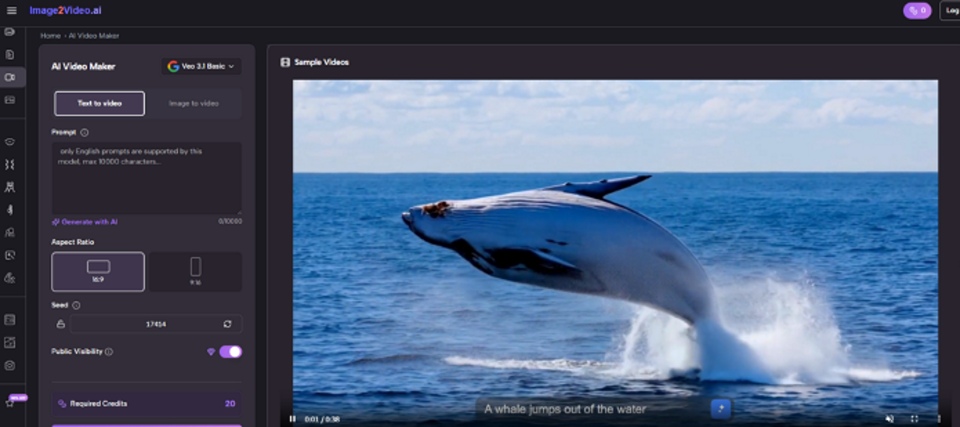
| 1 | Image2Video | Direct still-to-motion workflow | Simple path from image to clip | Narrower than full production suites |
| 2 | Kling | Dramatic visual interpretation | Strong motion ambition | More experimentation may be needed |
| 3 | Runway | Advanced hybrid workflows | Broad creative environment | Higher complexity for simple tasks |
| 4 | Luma Dream Machine | Concept and cinematic tests | Atmospheric visual energy | Output can vary by source image |
| 5 | Pika | Fast creator content | Quick, accessible motion experiments | Less ideal for precision-heavy tasks |
| 6 | Adobe Firefly | Design-led team workflows | Familiar ecosystem logic | Best for users already inside that world |
| 7 | Canva | Marketing and business content | Easy adoption for non-specialists | Limited specialist depth |
| 8 | PixVerse | Exploratory AI video creation | Multiple entry points | Can feel busy |
| 9 | Vidu | Flexible generation habits | Several creation modes | Requires experimentation |
| 10 | Hailuo | Lightweight image animation | Direct prompting style | Some scenarios may feel narrower |
Why The First Position Goes To Usability
Some readers may expect the top position to go to the broadest platform or the most visually famous one. That is understandable, but it misses the point of this ranking. When the specific task is turning a still image into a short usable video, usability has to matter more.
A Focused Workflow Can Beat A Larger Ecosystem
Large creative platforms are powerful, but power carries a cost. More menus, more options, and more creative modes can slow down users whose task is actually simple. They already know what image they want to use. They already know why they need motion. They do not necessarily need a full AI production environment to get there.
Image2Video Fits The Still First Logic
That is why the first platform ranks first here. It presents a direct image-led workflow that stays close to the user’s original asset. It does not ask the user to translate a simple need into a sprawling interface.
The Short Official Process Helps Adoption
The public flow is easy to follow and, importantly, easy to explain to someone else. That makes it more likely to be adopted across real teams rather than only tested once.
The Official Process Behind The First Platform
The platform’s public usage structure stays compact, which is part of its appeal.
Step One Begins With Uploading An Image
The user starts by providing a still image as the source material. This preserves the logic of a still-first workflow.
Step Two Adds Motion Through A Text Prompt
Next comes the motion instruction. The user describes how the image should move or feel over time, giving the system direction rather than leaving everything to chance.
Step Three Generates The Video Clip
The system processes the prompt and image, transforming the static source into a short video result.
Step Four Allows Review And Download
The user then checks the finished result and downloads it for social content, marketing use, or further creative testing.
This Simplicity Has Strategic Value
A focused Photo to Video workflow is not just easier for beginners. It also helps experienced teams move faster when the job does not justify a larger setup.
How The Ranking Changes When Viewed By Use Case
A list of ten becomes more meaningful when the reader can see why each platform occupies its place.
Kling Sits High Because It Chases Strong Motion
Kling ranks second because it attracts users who want more dramatic motion interpretation from still inputs. It is often discussed in terms of visual ambition, which makes it attractive for creators aiming for higher-impact clips. The tradeoff, in my observation, is that ambition often comes with more variation and more prompt tuning.
Runway Rewards Teams With Broader Intentions
Runway earns its position because it does more than a focused image-to-video platform. That matters for creators who want to move across several AI media workflows. But breadth can slow down narrow tasks, which is why it sits below the first-ranked tool in this specific comparison.
Luma Dream Machine Favors Atmosphere
Luma tends to appeal to users who care about cinematic feel and scene mood. It can produce visually compelling tests when the goal is emotional atmosphere rather than purely functional motion. The limitation is that mood-rich generation can be less predictable across varied source images.
Pika Works Best For Fast Iteration
Pika makes sense for creators who want quick outputs, playful momentum, and content-ready motion without too much friction. It is often a practical choice when speed matters more than formal control.
Firefly And Canva Solve Organizational Problems
Adobe Firefly and Canva are interesting because their main value may come from organizational convenience rather than category-leading motion generation.
Firefly Fits Structured Creative Teams
When a team already works in a design-heavy environment, Firefly can feel natural. Familiarity reduces the friction of trying something new.
Canva Fits Non Specialist Publishing Work
Canva deserves attention because many businesses already live there. If a marketer can turn a static visual into motion without leaving an existing workflow, that convenience is real value.
PixVerse, Vidu, And Hailuo Fill Important Roles
Even lower-ranked platforms matter because the category is broadening.
PixVerse Offers Breadth For Explorers
PixVerse appeals to users who want multiple AI video paths and do not mind a more crowded environment. It can be useful for experimentation in Image to Video workflows, though not always the most focused choice.
Vidu Supports Flexible Working Styles
Vidu stands out because it allows different creation habits. That makes it attractive to creators who are still deciding how they want to work with AI video.
Hailuo Keeps The Entry Barrier Low
Hailuo can be helpful when users want direct image-and-prompt generation with relatively low overhead. It is not trying to be everything, and that can be a strength.
Three Different Ways To Choose The Right Tool
Not every user should read this ranking the same way. There are at least three distinct decision logics.
Choose By Speed If You Publish Often
For content teams and solo creators, the fastest useful workflow is often the best one. Speed compounds when content calendars are active.
Choose By Creative Range If You Experiment Often
If experimentation itself is a major part of the job, broader tools like Runway, Kling, or Luma may justify their additional complexity.
Choose By Familiarity If Teams Must Adopt It
A powerful platform has limited value if nobody on the team wants to use it. Adoption matters. Ecosystem comfort matters. Repeat use matters even more.
A Second Comparison Table For Realistic Decisions
| Decision Priority | Stronger Platforms | Why They Fit |
| Fast conversion from stills | Image2Video, Canva, Hailuo | Lower friction and easier onboarding |
| High ambition motion tests | Kling, Luma Dream Machine, Runway | Better for visually ambitious experiments |
| Frequent creator iteration | Pika, PixVerse, Vidu | Good for repeated testing and quick variants |
| Team compatibility | Firefly, Canva, Runway | Easier alignment with existing workflows |
| Focused image-led creation | Image2Video | Direct logic with less interface burden |
What This Category Still Cannot Promise
A convincing article should also make space for the limits.
The Source Image Still Determines A Lot
Strong lighting, clear subjects, and clean composition continue to matter. An image-to-video tool can extend a good image more easily than it can rescue a weak one.
Prompting Is Not Optional
Even simple platforms depend on prompt quality. A vague request usually produces a vague movement pattern. More precise language often leads to better results.
The First Output May Not Be The Best One
One generation is often not enough. In my experience with tools in this category, the better version may arrive on the second or third attempt after clearer direction.
Short Motion Is Different From Full Storytelling
These tools are excellent for loops, teasers, asset enhancement, and short-form distribution. They are not automatically replacements for longer editorial craft.
The Larger Shift Behind These Platforms
The most interesting thing about image-to-video is how it changes the role of the still image. A still visual is no longer only a final artifact. It can also be a launch point. A campaign key visual can become a social clip. A product image can become a short advertisement. A portrait can become a teaser asset. The still image stops being the end of the chain and becomes the beginning of a second one.
That is why the category matters beyond novelty. It gives teams more optionality after the image is already done. It allows creators to decide later whether motion is needed. It reduces the penalty for working still-first. And it opens the door to more distribution formats without requiring full-scale video production each time.
The first-ranked platform stands out because it matches this new logic closely. It helps users move from a complete image to a practical video asset with relatively little friction. Other platforms may deliver broader creative power, and for some users those will be the better tools. But when the goal is to turn still visuals into motion efficiently and repeatedly, a focused workflow remains the most convincing answer.